> ## Documentation Index
> Fetch the complete documentation index at: https://docs.calbudget.com/llms.txt
> Use this file to discover all available pages before exploring further.
# SaaS spend calendar
> Review the CalBudget Business SaaS spend calendar, event statuses, monthly totals, and transaction detail overlay.
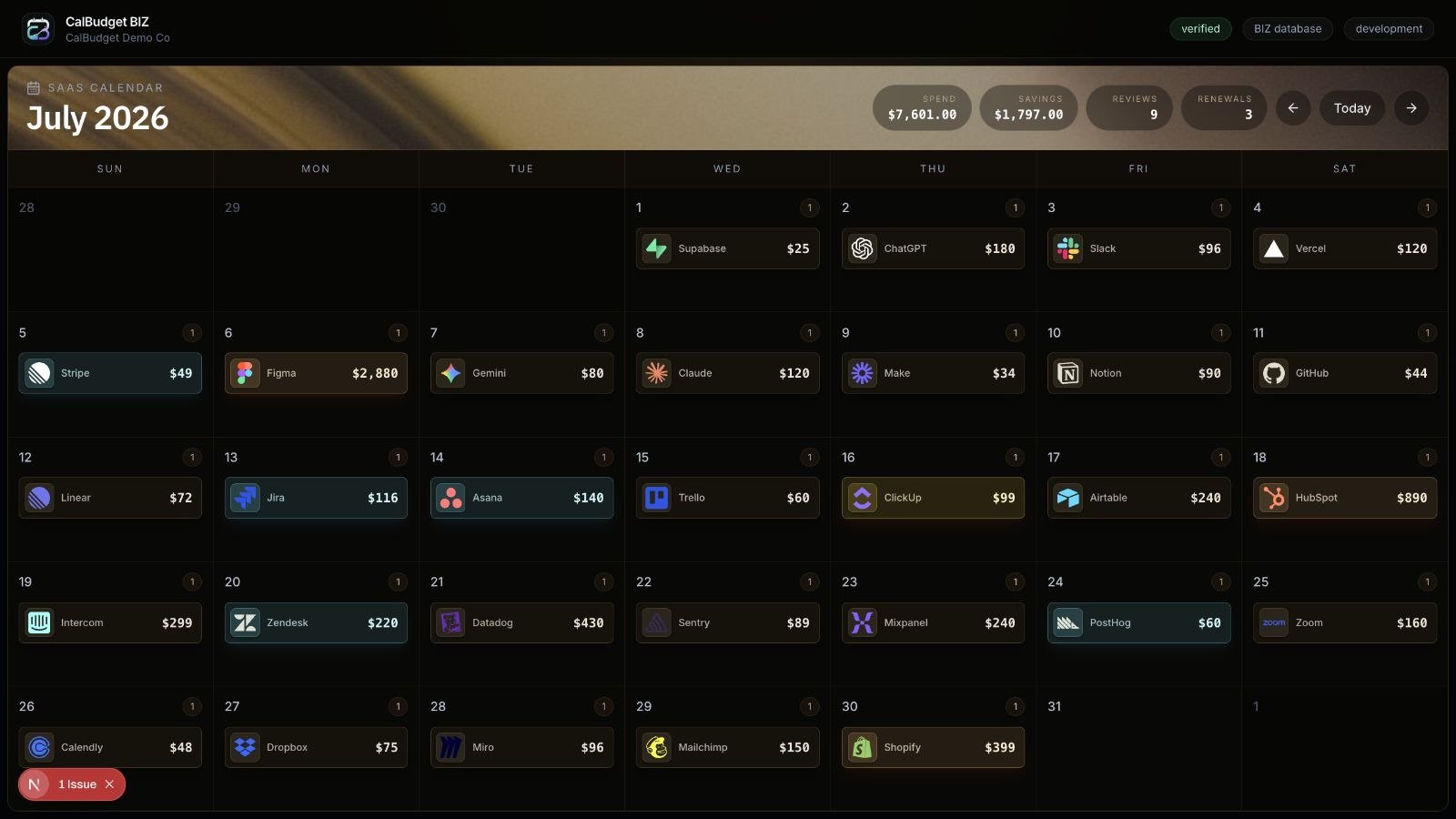
The CalBudget Business SaaS spend calendar turns business software charges, renewals, trials, and review work into a month-by-month operating view.
 ## What the calendar shows
The calendar groups business spend events by date and month. The header summarizes:
* Monthly SaaS spend
* Potential savings
* Review count
* Renewal count
Each day can show vendor events such as renewals, trial conversions, review items, and other SaaS spend events.
## Event types and statuses
Calendar events can represent different kinds of work:
| Event signal | Meaning |
| ---------------- | --------------------------------------------------------------- |
| Renewal | A subscription or vendor relationship is coming up for renewal. |
| Trial conversion | A trial may convert into paid spend. |
| Review | A vendor or charge needs a human decision. |
| Needs review | The event has enough signal to inspect but is not resolved. |
| Assigned | An owner has been assigned to follow up. |
Event styling should help teams spot urgency, but the decision still depends on the evidence attached to the event.
## Transaction detail overlay
Opening a calendar event shows a full-screen detail overlay with the event, vendor, account, transaction, and opportunity context available for that item.
Useful details include:
* Vendor name, category, logo, and website
* Amount, cadence, and confidence
* Source transaction and account
* Recurring pattern details when available
* Related savings opportunity
* Evidence and status
## How teams should use it
Use the calendar as a review queue, not just a spend report:
1. Start with renewals and trial conversions this month.
2. Open events marked needs review or assigned.
3. Check the evidence and confidence.
4. Assign an owner or due date when a human decision is needed.
5. Move approved savings actions into the audit workflow.
## What the calendar shows
The calendar groups business spend events by date and month. The header summarizes:
* Monthly SaaS spend
* Potential savings
* Review count
* Renewal count
Each day can show vendor events such as renewals, trial conversions, review items, and other SaaS spend events.
## Event types and statuses
Calendar events can represent different kinds of work:
| Event signal | Meaning |
| ---------------- | --------------------------------------------------------------- |
| Renewal | A subscription or vendor relationship is coming up for renewal. |
| Trial conversion | A trial may convert into paid spend. |
| Review | A vendor or charge needs a human decision. |
| Needs review | The event has enough signal to inspect but is not resolved. |
| Assigned | An owner has been assigned to follow up. |
Event styling should help teams spot urgency, but the decision still depends on the evidence attached to the event.
## Transaction detail overlay
Opening a calendar event shows a full-screen detail overlay with the event, vendor, account, transaction, and opportunity context available for that item.
Useful details include:
* Vendor name, category, logo, and website
* Amount, cadence, and confidence
* Source transaction and account
* Recurring pattern details when available
* Related savings opportunity
* Evidence and status
## How teams should use it
Use the calendar as a review queue, not just a spend report:
1. Start with renewals and trial conversions this month.
2. Open events marked needs review or assigned.
3. Check the evidence and confidence.
4. Assign an owner or due date when a human decision is needed.
5. Move approved savings actions into the audit workflow.