> ## Documentation Index
> Fetch the complete documentation index at: https://docs.calbudget.com/llms.txt
> Use this file to discover all available pages before exploring further.
# Debt payoff planner
> Track debts, compare avalanche and snowball strategies, and export a payoff schedule into a CalBudget calendar account.
The debt payoff planner helps you collect debt details, compare payoff strategies, and create a month-by-month plan that fits into your CalBudget calendar.
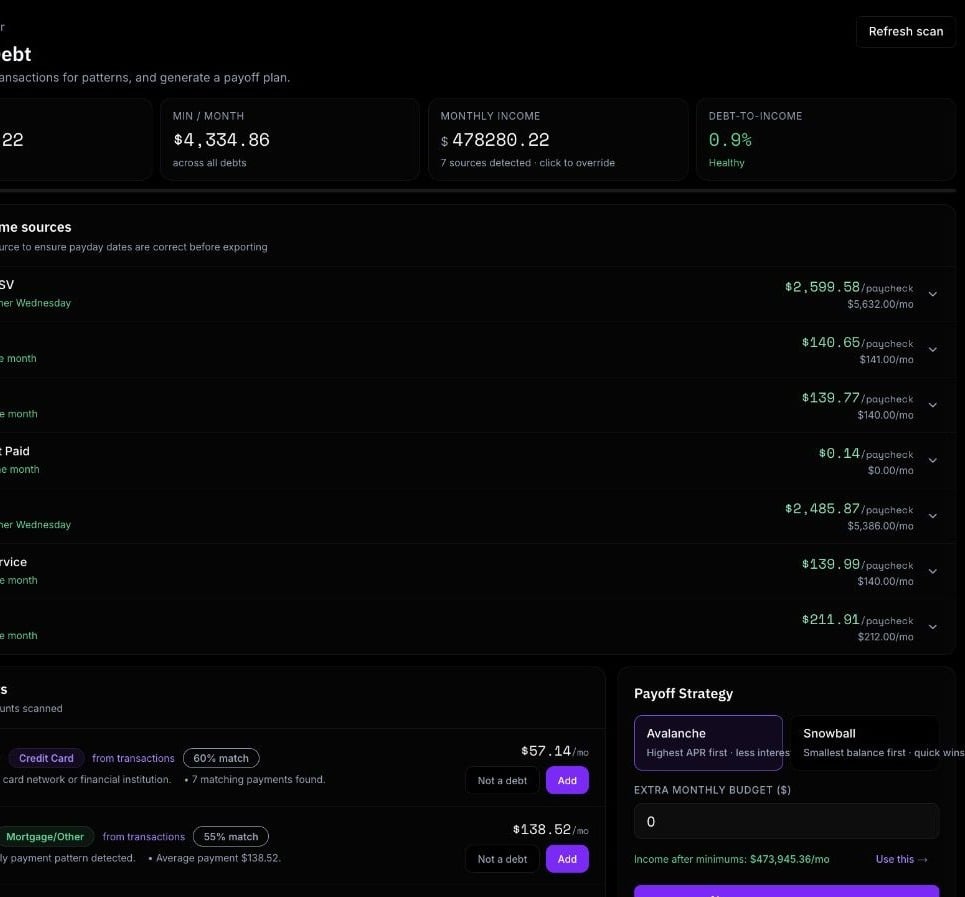 Store balances, APR, minimum payment, due day, debt type, and notes.
Review avalanche and snowball payoff orders before choosing a plan.
Add the generated schedule to a dedicated Debt Payoff Plan calendar account.
## Open the planner
Open Debt from the app navigation. The planner scans your CalBudget data and shows debt suggestions, tracked debts, income estimates, and payoff plan controls.
Debt payoff planning is part of the consumer CalBudget app. It uses your personal CalBudget data, not CalBudget Business data.
## Add debts
You can add debts in two ways:
* Accept a detected debt suggestion
* Add a debt manually
Debt suggestions may come from existing accounts, account names, payment keywords, repeated payment patterns, and related transactions. Review each suggestion before adding it.
For each debt, keep these fields as accurate as possible:
* Name
* Debt type
* Balance
* APR
* Minimum payment
* Due day
* Notes, if needed
The planner needs balances and minimum payments to generate a useful plan. APR improves interest estimates and strategy comparison.
## Review income and extra budget
The planner estimates income patterns from calendar data when possible. You can adjust or exclude income patterns before exporting a plan.
You can also set an extra monthly budget. If you do not set one, CalBudget can estimate extra payoff capacity from monthly income after minimum payments.
## Choose a strategy
CalBudget supports two payoff strategies:
Focuses extra payments on higher-interest debts first.
Focuses extra payments on smaller balances first.
The generated plan shows the selected strategy and compares it with the alternate strategy so you can see differences in months and estimated interest.
## Generate the plan
Select Generate after reviewing debts, income, and extra budget. The plan includes:
* Total debt
* Estimated total interest
* Estimated months to payoff
* Estimated debt-free date, when available
* Debt payoff order
* Month-by-month payment schedule
* Warnings when the plan is missing data or may not be feasible
These estimates depend on the data you enter. Real interest, fees, promotional rates, and lender rules can differ.
## Export to calendar
After generating a plan, you can export it to the calendar. CalBudget asks for the current account balance to set the starting point for the Debt Payoff Plan calendar account.
The export creates scheduled payment transactions in a dedicated `Debt Payoff Plan` account so you can view the payoff schedule alongside the rest of your cash-flow planning.
## Keep the plan current
Refresh the plan when:
* A balance changes
* A minimum payment changes
* Your income changes
* You add or remove a debt
* You make an extra payment
* A lender changes APR or terms
The debt payoff planner is informational planning help. It is not financial, legal, tax, or investment advice.
Confirm payoff amounts, interest, fees, and payment rules with each lender before acting on a generated schedule.
Store balances, APR, minimum payment, due day, debt type, and notes.
Review avalanche and snowball payoff orders before choosing a plan.
Add the generated schedule to a dedicated Debt Payoff Plan calendar account.
## Open the planner
Open Debt from the app navigation. The planner scans your CalBudget data and shows debt suggestions, tracked debts, income estimates, and payoff plan controls.
Debt payoff planning is part of the consumer CalBudget app. It uses your personal CalBudget data, not CalBudget Business data.
## Add debts
You can add debts in two ways:
* Accept a detected debt suggestion
* Add a debt manually
Debt suggestions may come from existing accounts, account names, payment keywords, repeated payment patterns, and related transactions. Review each suggestion before adding it.
For each debt, keep these fields as accurate as possible:
* Name
* Debt type
* Balance
* APR
* Minimum payment
* Due day
* Notes, if needed
The planner needs balances and minimum payments to generate a useful plan. APR improves interest estimates and strategy comparison.
## Review income and extra budget
The planner estimates income patterns from calendar data when possible. You can adjust or exclude income patterns before exporting a plan.
You can also set an extra monthly budget. If you do not set one, CalBudget can estimate extra payoff capacity from monthly income after minimum payments.
## Choose a strategy
CalBudget supports two payoff strategies:
Focuses extra payments on higher-interest debts first.
Focuses extra payments on smaller balances first.
The generated plan shows the selected strategy and compares it with the alternate strategy so you can see differences in months and estimated interest.
## Generate the plan
Select Generate after reviewing debts, income, and extra budget. The plan includes:
* Total debt
* Estimated total interest
* Estimated months to payoff
* Estimated debt-free date, when available
* Debt payoff order
* Month-by-month payment schedule
* Warnings when the plan is missing data or may not be feasible
These estimates depend on the data you enter. Real interest, fees, promotional rates, and lender rules can differ.
## Export to calendar
After generating a plan, you can export it to the calendar. CalBudget asks for the current account balance to set the starting point for the Debt Payoff Plan calendar account.
The export creates scheduled payment transactions in a dedicated `Debt Payoff Plan` account so you can view the payoff schedule alongside the rest of your cash-flow planning.
## Keep the plan current
Refresh the plan when:
* A balance changes
* A minimum payment changes
* Your income changes
* You add or remove a debt
* You make an extra payment
* A lender changes APR or terms
The debt payoff planner is informational planning help. It is not financial, legal, tax, or investment advice.
Confirm payoff amounts, interest, fees, and payment rules with each lender before acting on a generated schedule.